Inline Commands
Inline commands enable interaction with our bot in any Telegram chat. You can use simple queries to request important data and quickly send/receive assets to/from your Telegram contacts without leaving your conversation.
Some inline commands rely on the user's default currency parameter set in the following menu: Bot main menu > ⚙Settings > Bot currency.
How to use inline commands?
-
In any Telegram chat type @xrocket, followed by space and your query.
This functionality is what is shown in the example image below, with the user having typed
@xrocket 10 USDTand the bot offering "Cheque" and "Invoice" commands as options.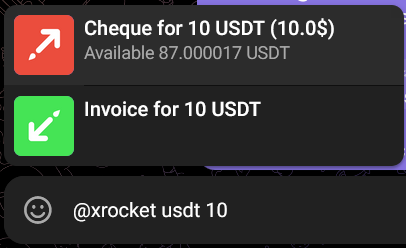
-
Select one of the suggested command options: Simply tap the command that you wish to use.
Our bot suggest all the commands available for a particular user based on the user's query and the wallet balances.
-
Interact with the results: The command will execute, and the result will be sent to the chat you are in.
For example, if you send a command to create an invoice, you will get the requested invoice in the same chat.
All xRocket Inline Commands with examples
xRocket provides the following inline commands to use:
Exchange Rate
This command displays market exchange rate of a specified token pair.
- Specify the token that you want to exchange as the first parameter.
- Optionally specify the second (price) token. Use space, - or / between the parameters.
For example, type @xrocket TON USDT to see the exchange rate of TON to USDT.
Note: If you specify only 1 token, then your default currency is used as the second token.
More examples:
@xrocket TON (exchange rate of TON to user's default currency)
@xrocket BTC/USDT (exchange rate of BTC to USDT)
@xrocket TON-USDT (exchange rate of TON to USDT)
Currency Converter
This command displays conversion rate of a specified token amount.
- Specify the amount that you want to convert as the first parameter.
- Add one or two crypto tokens or fiat assets as the second and the third parameter. Use space or = between the tokens you input.
For example, type @xrocket 100 TON USDT to request the conversion rate of 100 TON to USDT.
Note: If you specify only 1 token, then the user's default currency is used as the second token.
More examples:
@xrocket 100 USD RUB (conversion rate of 100 US Dollars to Russian Rubles)
@xrocket 100 SOL USDT (conversion rate of 100 SOL to USDT)
@xrocket 100 BTC USD (conversion rate of 100 BTC to USD)
Cheque
This command creates a cheque to send crypto to another Telegram user.
- Specify the amount that you want to send as the first parameter.
- Add a token that you want to send as the second parameter.
- Optionally add a telegram user name as the third parameter. Use space between parameters.
- Optionally add a free-form comment after all the other parameters.
For example, type @xrocket 10 USDT @telegram_user to create 10 USDT cheque for the specified @telegram_user.
Creating a cheque immediately locks the specified amount in your Funding balance. The funds remain locked until the cheque is claimed or you delete it.
You can specify your cheque amount in fiat asset and send that amount in any crypto that you have on your balance. To do so:
- Specify both fiat asset and the crypto token in your query. You can optionally use currency symbol (e.g., $) for fiat assets.
For example, type @xrocket 10$ ETH to create 10$ worth cheque in ETH token.
More examples:
@xrocket 10 USDT (10$ cheque with no specified recipient)
@xrocket 10 USD TON @telegram_user (10$ worth cheque in TON created personally for @telegram_user)
@xrocket 10$ TON @telegram_user (10$ worth cheque in TON created personally for @telegram_user)
@xrocket 10 USDT enjoy your cheque! (with comment)
Invoice
This command creates payment invoices to receive crypto from other Telegram users. Similar to cheques but has fewer parameters.
- Specify the amount that you want to receive.
- Add a token that you want to receive as the second parameter. Use space between parameters.
- Optionally add a free-form comment after all the other parameters.
Examples:
@xrocket 100 USDT (100 USDT invoice)
@xrocket 100 USDT enjoy this invoice (100 USDT invoice with comment)
Referral Link
This command requests the user's personal referral link.
Type plain @xrocket in any Telegram chat to request the link.
Deposit Address
This command displays deposit address for topping up your wallet. Type w or wallet, optionally followed by network in your query. If you specify no network, the bot displays addresses for all the supported networks.
Always verify the deposit address and network before sending funds. Sending assets to the wrong network or address will result in permanent loss of funds.
Examples:
@xrocket w
@xrocket wallet
@xrocket wallet TON (for a specific network)
Dash Currency Rates
This command displays rates for the specified currencies. The rates are displayed in user's default currency.
Type @xrocket dash to access Dash help menu.
- Specify up to 5 desired tokens.
Examples:
@xrocket dash
@xrocket dash BTC
@xrocket dash BTC ETH USDT SOL TON
Troubleshooting
If a command is not appearing, check your spelling and make sure you typed @xrocket followed by a space before your query. If a command is not working, ensure you have sufficient funds and that all parameters are correct.
If the issue persists, contact xRocket support for assistance.