Withdraw Crypto
xRocket enables withdrawing crypto from your wallet via several methods:
-
You can use our Telegram bot or mini app to transfer assets from your xRocket wallet to another xRocket wallet or a wallet of another supported network.
-
You can trade on P2P market to sell your asset and get fiat asset you want.
Withdrawals are subject to network fees and minimum amounts. See How to check current fees and limits? for details.
How to Withdraw Crypto?
- Bot
- Mini App
- Navigate to My Wallet → Withdraw page.
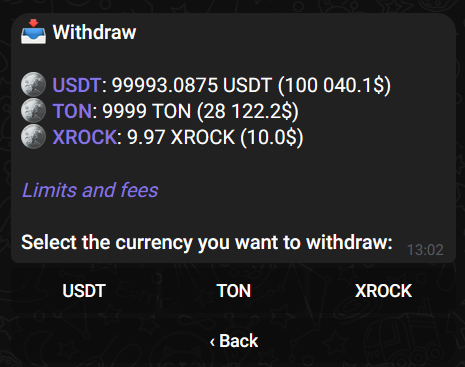
- Select an asset to withdraw (and a network if applicable).
- Specify an amount to withdraw and the recipient address in the selected network.
- Add a comment (MEMO) if required.
- Review the entered information and confirm the transaction.
- On the Wallet tab tap Withdraw.
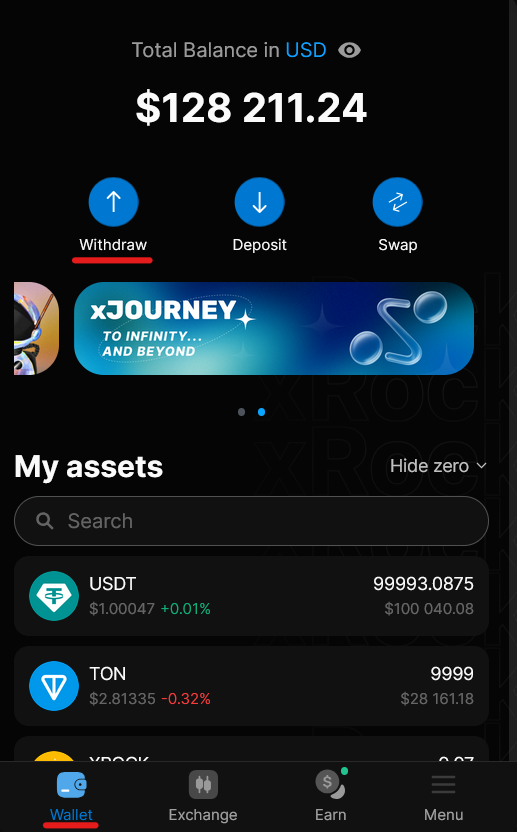
- Select an asset that you want to withdraw (and a network if applicable).
- Specify the recipient address in the selected network and the amount to withdraw.
- Add a comment (MEMO) if required.
- Review the entered information and confirm the transaction.
If the recipient exchange or wallet requires a MEMO (also called Tag or Comment), make sure to include it. Missing a required MEMO can delay or prevent the deposit on the recipient's side.
Always verify that you are withdrawing to the correct network. For example, if you selected ETH-ERC20, you must provide an ETH-ERC20 address. Sending to the wrong network will result in permanent loss of funds.
Withdrawal Status
xRocket confirms withdrawals only after the transaction receives the required number of blockchain confirmations. This may take from a few seconds to several minutes depending on network congestion.
Our bot is designed to provide withdrawal confirmation only after the transaction is confirmed on the blockchain and has received the required number of confirmations. This ensures that the recipient's blockchain has actually received the asset before you are notified.
Possible withdrawal delays:
-
Delay from xRocket or the withdrawal blockchain: If you experience a delay and the bot has not yet displayed a confirmation message, the issue is likely due to high network traffic or processing delays on either our platform or the blockchain.
-
Delay from the recipient's services: If the bot has already confirmed the withdrawal but the recipient still hasn't received the assets, the delay is with the recipient's wallet or service. In this case, the transaction was successful on the blockchain, and the recipient should investigate the issue with their service provider.